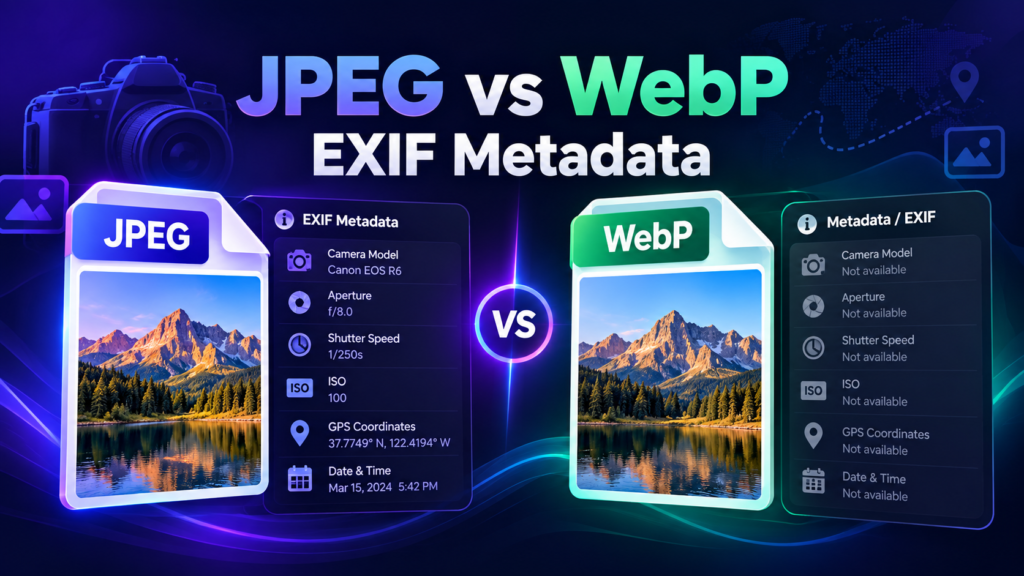
JPEG has the broadest and most predictable EXIF support, while WebP can carry metadata but support varies more between encoders, decoders and publishing platforms. If preserving GPS or camera metadata is essential to your workflow, verify the exported file instead of assuming that every format conversion kept the same fields.
JPEG and EXIF
JPEG has been used with EXIF for decades and is widely supported by cameras, photo software and metadata viewers. GPS, date/time, camera settings, orientation and descriptive fields are commonly found in JPEG files. This makes JPEG a practical choice when metadata compatibility matters more than maximum compression efficiency.
WebP and Metadata
WebP is designed for efficient web image delivery and can support EXIF and XMP metadata. The important practical issue is not whether the format can contain metadata, but whether the exact software in your workflow writes, preserves and reads the fields you need. Some conversion tools keep metadata; others discard part or all of it.
JPEG vs WebP for a Geotagging Workflow
| Consideration | JPEG | WebP |
|---|---|---|
| EXIF ecosystem | Very mature | Supported, but workflow dependent |
| Browser delivery | Universal | Modern and efficient |
| Typical file size | Larger at similar visual quality | Often smaller |
| Metadata verification | Still recommended | Especially important |
| Best use | Compatibility-focused master/export | Web-performance-focused delivery |
What Happens During Conversion?
When software converts JPEG to WebP or WebP to JPEG, it re-encodes image pixels and decides separately what to do with metadata blocks. That decision depends on the encoder. A converter can preserve EXIF, intentionally strip it for privacy, or lose unsupported fields without clearly telling the user.
Always Verify the Final File
If GPS information matters, inspect the file after the last conversion step. Use the EXIF Checker on the exact file you plan to upload. This is especially important if the file has passed through a CMS, image optimizer, messaging app or design platform.
Which Format Is Better for a Website?
For website delivery, choose the format that gives you the right balance of quality, compatibility and performance. WebP often reduces transfer size, which can help page performance. JPEG remains useful for photography workflows and compatibility. Many sites keep a high-quality master file and generate optimized delivery versions for the web.
Which Format Should I Use for Business Photos?
Use a format accepted by the platform and preserve a verified master copy. The visible quality and relevance of the photo matter more to users than the metadata container. If you intentionally add GPS metadata, verify it before upload and do not claim that the field alone guarantees better local rankings.
Metadata Privacy Applies to Both Formats
Do not assume a WebP conversion removed location data, and do not assume a JPEG always contains it. Inspect the final file. For customer locations, homes, schools or other sensitive places, consider publishing a version without precise GPS metadata.
Recommended Workflow
- Keep an original master image.
- Choose the intended public format.
- Add or remove metadata intentionally.
- Export the final file.
- Check the final file in an EXIF viewer.
- Upload that verified copy directly.
Verify Metadata After Conversion
Check the exact JPEG or WebP file you plan to publish.